Every on-page issue.
Three seconds.
A-Z on-page analysis, plain English explanations, and branded reports in 10 seconds.
Your clients will think you spent hours.
 Add to Chrome
 Add to Firefox
- Full audit in under 3 seconds. Report in 10.
- No account, no login, no data sent anywhere.
- All 12 sections, all features. Free forever.

Why it exists
Four problems every SEO professional knows.
These are not edge cases. This is the job.
01“Your client asks for an audit. You open Screaming Frog, PageSpeed Insights, a schema validator, a readability checker, and a blank Google Slides deck. Three hours later you have something to send.”
One side panel in Chrome or Firefox. Every check across 12 audit sections in under 3 seconds. No installs, no exports, no tab switching.
3 hrs back02“You did the analysis. Now you spend another hour screenshotting, pasting into Canva, adding your logo, writing plain-English explanations, and formatting. Every time. For every client.”
Branded PDF in 10 seconds. Your logo, your agency name. The report covers all audit sections, SERP previews, and issue cards with fix steps. One click.
1 hr back03“"What does LCP mean?" Your client forwards the report to their marketing manager. The marketing manager forwards it to their boss. Nobody knows what to do with it.”
Plain English Mode rewrites every technical finding into language any client can read and act on. Toggle it on before exporting. No jargon knowledge required on either side.
Zero questions04“You fixed the issues. The score went from 61 to 84. But you have nothing to show for it. No before state captured, no timestamped record, no way to justify the retainer.”
Save any audit as a snapshot. Run it again next month and compare. Score delta, section-by-section changes, and a before/after chart that proves exactly what moved.
Monthly proof12 audit sections
Every on-page signal. Explained.
Click any section to see what it checks, an example finding, and why it matters.
Prioritised list of the most damaging problems: missing H1, noindex detected, broken canonical, missing meta description, thin content, missing schema, robots.txt block.
3 Critical: missing H1, page marked noindex, meta description absent on all product pages.
This panel is the first thing you see. It tells you what to fix first so you are not guessing which issue costs the most traffic.
Title tag length, pixel width, keyword presence, SERP preview. Meta description length, keyword presence, CTA words. Canonical URL, robots meta, viewport, charset, hreflang tags.
Title is 94 characters (cut to under 60). Meta description missing. Canonical tag absent, page accessible via 3 URLs.
Title tags are the number one on-page ranking signal. Missing or over-length titles are immediate losses.
Keyword density and stuffing detection. Keyword presence in title, H1, meta, first paragraph, URL, alt text. H1-H6 heading hierarchy tree. Readability score and grade level. Word count, passive voice, transition words, reading time.
Word count: 187 (below 300-word threshold). Keyword missing from H1 and first paragraph. H2 appears before H1.
Thin content and poor heading structure are common reasons pages lose rankings after core updates.
Core Web Vitals (LCP, CLS, INP, FCP, TTFB) from Google PageSpeed API. Mobile and desktop scores. HTTPS and mixed content. robots.txt fetch, noindex detection, sitemap presence. URL structure: length, underscores, depth.
LCP: 4.2s (Poor). CLS: 0.18 (Needs Improvement). Page accessible via HTTP without redirect.
Core Web Vitals are a confirmed ranking factor. LCP over 2.5s loses search traffic.
Internal link count, generic anchor text, orphan link warnings. External links: dofollow/nofollow, sponsored/UGC attributes, authoritative domain detection. Broken link checker with per-link status codes.
2 broken internal links. 4 anchor texts are "click here". 1 external link missing rel="noopener".
Internal links pass PageRank and signal topic depth. Broken links harm crawl budget and user experience.
Missing and empty alt text. Images without width/height (CLS risk). Legacy format usage (JPG/PNG vs WebP/AVIF). Lazy loading status. SVG usage.
6 images missing alt text. Hero image is 1.4MB (should be under 200KB). 3 images have no width/height.
Alt text affects accessibility and image search. Oversized images directly hurt LCP scores.
22 schema types detected across JSON-LD, Microdata, and RDFa. Per-block validation with required and recommended properties. Schema code generator for Article, FAQPage, LocalBusiness, Product, BreadcrumbList, Organization.
FAQPage schema detected but "acceptedAnswer" property missing on 2 items. Rich result ineligible.
Valid schema enables rich results and improves AI citation. Invalid schema silently blocks both.
HTML language attribute, heading hierarchy, descriptive link text, form labels, color contrast, ARIA landmarks, skip navigation, video captions, focus indicators, alt text coverage.
Color contrast ratio 3.2:1 (below 4.5 minimum). 3 form inputs have no label. HTML lang attribute missing.
Google ranking signals and AI content extraction both overlap with accessibility. Fixing one improves both.
NAP (Name, Address, Phone) detection and consistency. LocalBusiness schema presence and type. Opening hours in schema, Google Maps embed, service area, location keywords in title and H1, review markup, GeoCoordinates.
LocalBusiness schema detected but opening hours missing. NAP found in footer but inconsistent with schema.
Local signals directly affect Google Maps and local pack rankings for location-based queries.
All issues from all sections aggregated, ranked by impact. Each card shows: severity, plain-English explanation, exact fix steps, effort estimate (5 min / 30 min / Dev needed), and impact rating. Filter by priority, effort, or section.
Score projection: fixing 3 Critical and 4 High issues could raise your score by approximately 18 points.
Instead of hunting across 11 sections, this panel gives you a single prioritised work order.
Branded cover, overall score ring, SERP preview, social card preview, full issues list with fix steps, PageSpeed data, fix history log, before/after snapshot comparison, schema health, link quality, accessibility summary, keyword analysis.
Generate a complete branded report with agency logo and Plain English Mode in one click. Ready in 10 seconds.
The feature no competing free extension has. A full client-ready report that looks like you spent hours.
Plain English Mode
Your clients deserve to understand their report.
Every technical finding in SEOFliq has a plain English version. Drag the slider to see how it works.
This is what your clients see in the PDF. Toggle Plain English on when generating your report.
Signature feature
A branded client report in 10 seconds.
One comprehensive report. Your logo. Plain English Mode. No formatting, no copy-paste, no slides.
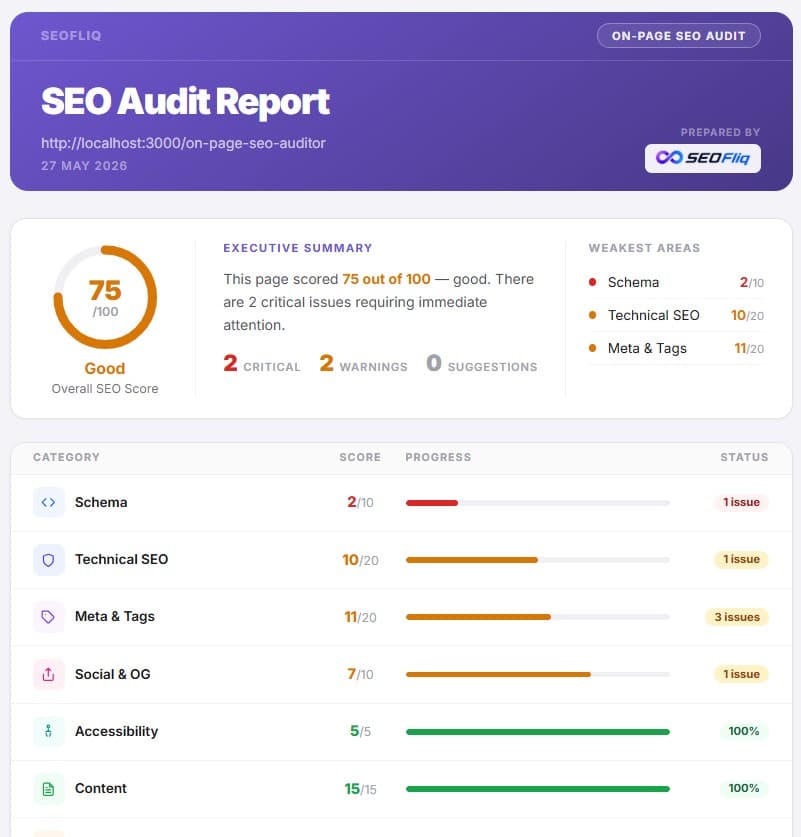
Your agency branding on every report
Add your logo, agency name, brand color, and contact details once in Settings. Every report carries your branding automatically. Free, no upgrade needed.
SERP and social card previews
The report shows exactly how the page appears in Google search results and when shared on LinkedIn, Facebook, and Twitter/X. Clients see the problem without needing an explanation.
Fix history as proof of work
Every issue you mark as fixed is timestamped and logged. Auto-included in the report as a "Changes Made" section. For retainer clients, this is the most compelling thing in the document.
Before/after snapshot comparison
Save the current audit, run it again next month, and compare. Score delta, section-by-section changes, and a chart. The cleanest way to justify a monthly retainer.
Your page takes 4.2 seconds to fully load on mobile. Google considers anything over 2.5 seconds "Poor" and ranks these pages lower in search results. Fixing this is your highest-priority improvement.
Who uses this
Built for people who work with clients.
Every workflow is different. The common thread: results fast, reports that do not need explaining.
Freelance SEO Consultants
Audit a prospect's site live during a sales call. The most memorable pitch move in the industry.
- Run a live audit in any sales call or discovery meeting
- Branded PDF delivered as the first onboarding deliverable
- Fix History Log justifies retainer fees every single month
Client emails Friday at 4pm asking for a quick audit. You send a branded report before 4:15.
SEO Agencies
Day-one audit for every new client. No crawl setup, no waiting, no wasted hours.
- Works on any URL the moment it loads
- Three report templates for different briefs
- No per-seat pricing, no account required
Three client kick-offs on Monday. Full branded audits in every inbox by 10am.
In-House SEO Teams
Audit any page before publish, track issues over time, and share findings with developers.
- No IT setup or admin access needed
- Share PDF directly with developers or PMs
- Works on staging and production URLs
New landing page going live tomorrow. Audit it, share the PDF with the dev, issues fixed same day.
Tool comparison
How it stacks up.
Screaming Frog is built for crawlers. MozBar is built for SERP analysis. SEO On-page Auditor is built for client-facing work.
| Feature | SEOFliq | Screaming Frog | MozBar | SEOptimer |
|---|---|---|---|---|
| Best for | Client reports | Site-wide crawls | SERP analysis | Quick audits |
| Starting price | Free | £149/yr | Free (limited) | $19/mo |
| Branded PDF report | ||||
| Plain English mode | ||||
| Before/After snapshots | ||||
| Works in browser sidebar | ||||
| Core Web Vitals (CWV) | ||||
| Schema markup audit | ||||
| No login required |
Comparison based on public feature sets as of 2026. Partial = limited or paid-only version.
FAQ